Applies to
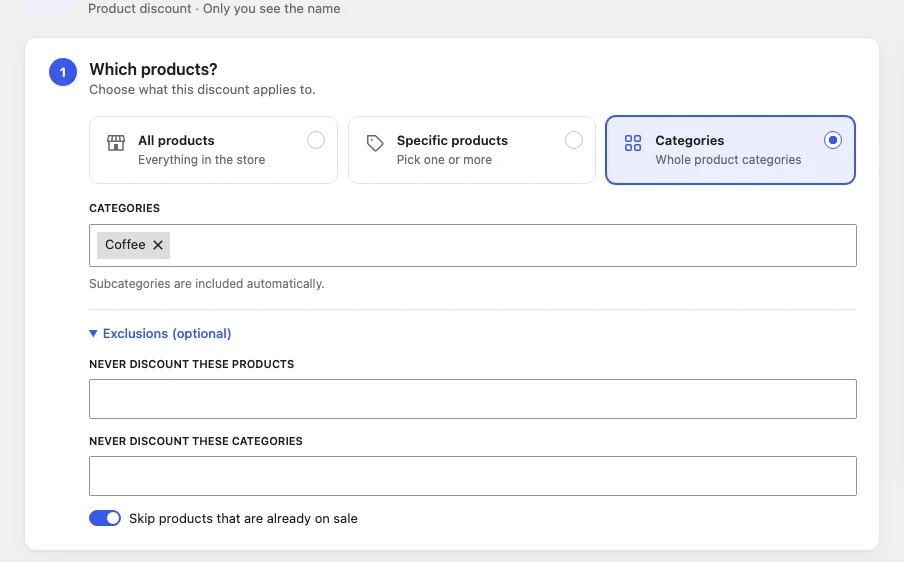
| Option | What it covers |
|---|---|
| All products | Every product in the store. |
| Specific products | Products you pick. Choosing a variable product covers all of its variations. |
| Categories | Every product in the chosen categories, including their subcategories. |
To pick products or categories, start typing a name (or SKU) in the box and choose from the suggestions. Press Enter to take the first suggestion. Remove one with its ×.
Exclusions
Open Exclusions (optional) to leave things out, even when they match the products above:
- Never discount these products
- Never discount these categories (subcategories included)
- Skip products that are already on sale: products with a WooCommerce sale price are left at that price.
Tip: A common pattern is “All products” plus a few exclusions, for example a store-wide sale that leaves gift cards and clearance items alone.
Which price is discounted?
Discounts are worked out from the product’s current price. For products already on sale that is the sale price, unless you tick “Skip products that are already on sale”.