Pro feature. Requires Kayce Discount Rules Pro. Without Pro, rules that have conditions are kept but not applied.
Conditions live in step 3, Who and when?, of every rule type, including the free ones. Click Add condition and choose a type. When a rule has several conditions, all of them must be true.
Cart subtotal
At least or Less than an amount. The subtotal is measured before discount rules and without free gifts, so a discount can never take a cart back below the threshold that unlocked it.
Cart item count
At least or Less than a number of items in the cart (free gifts not counted).
User role
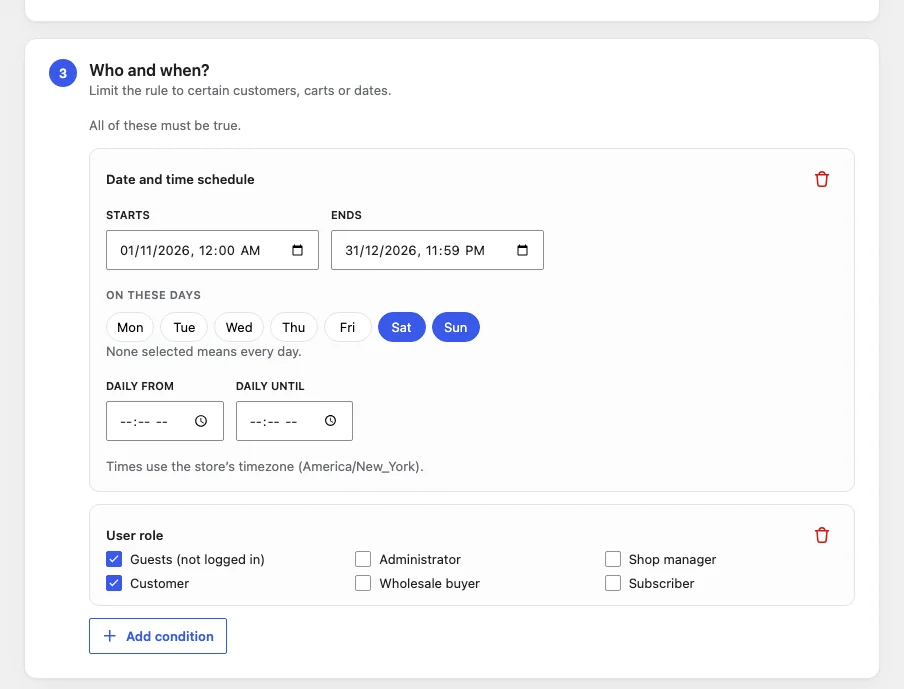
Tick the roles that qualify. Guests (not logged in) is listed too. Example: a wholesale discount for a “Wholesale buyer” role.
First order
Only customers who have never placed a paid order. Logged-in customers are checked by account; guests by the billing email they enter at checkout, so a guest counts as new until they type an email that has ordered before.
Date and time schedule
- Starts and Ends: optional dates and times. An end date without a time lasts until the end of that day.
- On these days: pick weekdays, or none for every day.
- Daily from / until: a time window, such as 18:00–21:00 for a happy hour. Windows past midnight (22:00–02:00) work too.
Times use your store’s timezone (Settings → General).
Page caching: Discounted prices shown in the shop follow conditions. If you use full-page caching, cached product pages may show yesterday’s price for a short while when a schedule starts or ends. Cart and checkout are never cached, so the price charged is always right.
Conditions and shop prices
Conditions are checked for shop and product page prices as well as in the cart. A “cart subtotal at least $100” product discount, for example, shows on product pages only once the shopper’s cart has reached $100.